Q. How to use the OBSERV stand
Q.1. What comes with the stand:
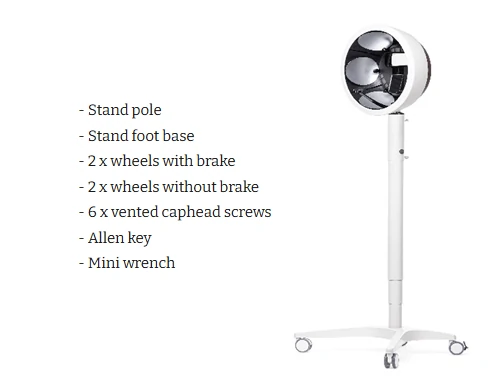
Q.2. Set up
1. Turn the stand pole upside down.2. Grab the stand foot base and turn it upside down and align it with the stand pole, making sure all the screw holes line into place.3. Once the foot base is in position, use the 6 x screws to fasten the stand pole and foot base together, make sure to tighten all screws securely with the provided Allen key. 4. Attach each wheel to each corner of the foot base and tighten the wheels using the supplied wrench. Make sure to fasten the wheels with breaks on the short legs of the foot base. 5. Once all wheels are attached, place the mobile stand in the upright position, and insert the top part of your OBSERV into the mobile stand.

6. Use the two hooks on the stand pole to wind the power cord neatly when the OBSERV is not in use.
Q.3. How to use the OBSERV Mobile Stand
1. Depending on whether your client wants to sit or stand, place a chair or stool in front of the OBSERV for your client to sit on and press the grey button to adjust the height of the mobile stand by moving the support column up or down. If your client is standing, ask them to secure their hands on the OBSERV stand pole once they are positioned in the correct height.

2. For the correct height it is recommended to have the lightshade off, make sure your client is sitting or standing with a straight back and is able to position their chin on the chinrest. Once the correct height is positioned then reattach the light shade and start the analysis.
Q.4. Safety and best practice tips
Before moving around the mobile stand:- Unplug the OBSERV and store the cord.- Remove the iPad holder.- Move the mobile stand by its support column.- Be careful when maneuvering around doorsteps or uneven floor surfaces.- Use the breaks when ready to run an analysis.
