Take your time and “train your eyes”
This is our advice when you begin consultations with the OBSERV device.
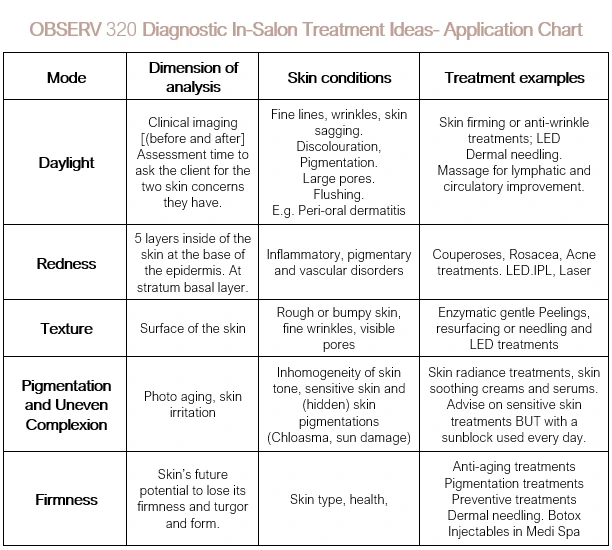
The OBSERV 320 Skin Analysis device contains 4 diagnostic modes for an in-depth skin assessment of concerns. OBSERV 320 can scatter light in, and across the skin’s cellular network. Within these epidermal layers, OBSERV 320 light rays message OUR EYES, the scientific information regarding the health and functionality of the clients’ cellular network. What is fascinating is that skin contains a plethora of fluorescent compounds, such as collagen, elastin, coenzymes and various substances like melanin, fibres, and blood vessels. These compounds are exactly what the OBSERV focuses on as we cannot see or read these with our naked eyes in a consultation. By photo documenting non-surgical treatments such as injectables, chemical peels, and laser resurfacing, plus pigmentary and acneic treatments you can monitor and improve the progress of these Medi-spa and advanced skin therapy modalities. You create skin awareness with this unbiased proof with the clinical visuals, that are all collected in under 10 seconds!
This Focus is on travelling through the layers to see the functionality exposed by these 4 modes. • Colour• Pigmentation• and Texture visually presented to you and your client.• Firmness Mode – remove the colour from Skin and exposure the firmness levels and support offered to the skin by its structural integrity firmness. Excellent for analysing Skin Health and Skin Appearance and introducing clients to home care maintenance procedures to gain a glowing healthy skin.
1. Start with collecting the OBSERV Clinical visuals.2. Detach the iPad from OBSERV 320.3. Sit with your client and complete your in-house consultation protocol.4. Now look at the OBSERV visuals and start with the Daylight visual. Ask your client;” What are your two major Skin Concerns?” whilst looking at this Daylight Visual. 5. Use the concern button and select the corresponding concern categories and draw/mark these on the client’s visuals.6. Show only the visuals that relate to the clients concerns you can look at the others in another consultation time. Your focus must be on the two concerns the client has initially.7. Continue your discussion using the full functionality the OBSERV 320 App offers you.8. Bring the client data from your full consultation to the analysis and viewing of the clinical visuals. You need to find out “WHY” the skin is reflecting its story to you before you can begin to create effective results driven annual treatment plans and take -home retail packages.